Showing posts with label Mobile Forensics. Show all posts

Thursday, April 11, 2019

Nest camera app (DFRWS2018 Challenge)

Last February, I started playing the DFRWS 2018 challenge:


This is a brief description of the challenge taken from the website:

"The DFRWS 2018 challenge is about Internet of Things (IoT), defined generally to include network and Internet connected devices usually for the purpose of monitoring and automation tasks. Consumer-grade “Smart” devices are increasing in popularity and scope. These devices and the data they collect are potentially interesting for digital investigations, but also come with a number of new investigation challenges."

Unfortunately for me, I soon had to dedicate my free time to something else and forgot about the challenge. Since the submission window is now closed (the submission deadline was March 20, 2019), I'd like to share my findings about an extension-less SQLite database named frame_database belonging to the Nest app for Android installed on the mobile device found at crime scene. This post is not a full analysis of the app.

The file is located here:
  • Evidence: Samsung GSM_SM-G925F Galaxy S6 Edge
  • Physical image: blk0_sda.bin
  • Database path: P18\data\com.nest.android\cache\f315c6e2b5434a5381f1f5be6f73b4b3

The frame_raw_data_table table in the database caught my attention due to its name and I thought it could contain pictures or videos. The table contains 4548 records and its column names are:

frame_time | chunk_id | chunk_version | gop_start_rowid | sps_bytes | pps_bytes | frame_bytes | chunk_complete

A bit of googling made me find out that gop, sps and pps are parameters related to H.264 videos and stand for:

  • GOP = Group of pictures
  • SPS = Sequence Parameter Set
  • PPS = Picture Parameter Set

This post at stackoverflow was also useful to understand that a stream could look like this:

(AUD)(SPS)(PPS)(I-Slice)(PPS)(P-Slice)(PPS)(P-Slice) ... (AUD)(SPS)(PPS)(I-Slice)

The explanation of all these terms is beyond the scope of this article. The only thing to care about is that there's a data sequence that needs to be rebuilt in order to get meaningful data to analyze.

Having said that, this is a data snippet of what is stored in the database:


The chunk_id field is a timestamp. Frames belonging to the same group have the same chunk_id. The last frame of each group has the chunk_complete value set to 1. The frame_time field is a timestamp too, but I haven't investigated the relationship between this field and the chunk_id. I noticed there's a significant time difference between the two fields. For instance:

  • frame_time 1526289810036 translates to 14/05/2018 09:23:30 Unix milliseconds
  • chunk_id 1526288836 translates to 14/05/2018 09:07:16 Unix seconds

After several failed data combination attempts, I found out that the following fields containing blob data have to be concatenated in this order to build a working group of frames:

sps_bytes || pps_bytes || frame_bytes (first) || frame_bytes (second) || ... || frame_bytes (last)

I achieved this operation by using a SQL query built with the concatenation operator || and the GROUP_CONCAT function:

SELECT chunk_id,
       ( Hex(sps_bytes) || Hex(pps_bytes)|| frame_bytes ) AS frame_bytes
FROM   (SELECT chunk_id,
               sps_bytes,
               pps_bytes,
               GROUP_CONCAT(Hex(frame_bytes), '') AS frame_bytes
        FROM   frame_raw_data_table
        GROUP  BY chunk_id) 


Then I wrote a quick Python script to automate the data extraction and write data to binary files. To try the script, just copy the code below and customize the paths of db and output_path.

To make Python 3.7.2 correcly execute the SQL query, I had to download the latest version of the SQLite dll from here (I used 64-bit DLL x64 for SQLite version 3.27.2) and save it to C:\Python37\DLLs and overwrite the existing one.

from datetime import datetime
import binascii
import sqlite3

db          = "C:\\temp\\frame_database"
output_path = "C:\\temp\\"

conn = sqlite3.connect(db)
conn = conn.execute("SELECT chunk_id,(hex(sps_bytes) || hex(pps_bytes) || 
frame_bytes) AS frame_bytes FROM (SELECT chunk_id,sps_bytes,pps_bytes,
GROUP_CONCAT(hex(frame_bytes),'') AS frame_bytes FROM 
frame_raw_data_table GROUP BY chunk_id)")

rows = conn.fetchall()

for row in rows:
    chunk_id    = row[0]
    frame_bytes = row[1]
    timestamp   = datetime.utcfromtimestamp(float(chunk_id))
    timestamp   = str(timestamp).replace(" ","_").replace(":","")
    filename    = output_path + str(chunk_id) + "_" + timestamp + ".h264"
    video       = open(filename,"wb")
    video.write(binascii.unhexlify(frame_bytes))

The very small video files (9KB/83KB) can be played with VLC media player (3.0.6):


There's always something new to learn.

Thanks DFRWS for the challenge!


Wednesday, October 3, 2018

Calllog.db and SMS data on Android 7.0 Nougat

A few weeks ago, Jamie McQuaid at Magnet Forensics wrote an interesting article titled Android Messaging Forensics – SMS/MMS and Beyond. The article is a great overview of the different databases that Android uses to store SMS/MMS data.

Based on my recent findings, I think that another database should be mentioned: calllog.db. During the analysis of two Samsung smartphones (SM-G935F and SM-G930F) running Android 7.0, I've found out that calllog.db also contains SMS data.

I was able to find and analyze this db because I had created a physical dump of the two non-rooted smartphones by using UFED 4PC. I haven't verified if the file can be obtained with other methods like a ADB backup.

This sqlite database can be found here:

\data\com.android.providers.contacts\databases\calllog.db

The table calls within the database has a column named m_content. If the length of this field is greater than 0, it means that the record contains a text message (if zero, it's a phone call log).

At a quick glance, the most relevant fields in the table are:
  • number: sender's or recipient's phone number;
  • date: message date;
  • type: its value indicates if it's a sent or received message; 
  • name: contact name associated with the phone number;
  • last_modified: message date (it usually matches the date of the field date);
  • m_content: first 50 characters of SMS message body.

This is a quick query to view the contents of these fields:

SELECT number,datetime(date/1000,"unixepoch","utc") AS date,type,name,datetime(last_modified/1000,"unixepoch","utc") AS last_modified,m_content FROM calls WHERE m_content <>""


If I run the query SELECT DISTINCT type FROM calls WHERE m_content <>"", I can see that the field type has value "1" or "2". After some comparison with other messages, I deduced that "1" means "received" and "2" is "sent".

As of writing, by default the tools UFED Physical Analyzer (7.9.0.223) and Magnet AXIOM (2.5.1.11408 - with custom artifact plugin) only extract call logs from calllog.db.

This is how I adapted the tools to my needs.

UFED Physical Analyzer

By using the internal tool SQLite Wizard within the Physical Analyzer, I created a query to do the parsing:

Select calls.number,
  calls.date,
  calls.type,
  calls.name,
  calls.last_modified,
  calls.m_content
From calls
Where Length(calls.m_content) > 0

I then mapped the fields by drag&drop and customized the conditions of the field type.


I ran the query and successfully retrieved 500 additional SMS records that I added to my report.


The table shows the big difference in the number of SMS found before and after parsing the file calllog.db.

(before)

(after)

Some messages were duplicates, but many others were not. This is an example sorted by message body:

While creating the query, I tried with and without the "include deleted rows" option. In the end I decided to keep it unticked since I was getting too many false results.

Anyway you can download both query versions from here.

How to import and run the query: Physical Analyzer | Tools | SQLite Wizard | Open SQLite query manager | Import | select the query file to use | Run.


Magnet Axiom

When creating a new case with Magnet AXIOM Process, I recommend to use the Dynamic App Finder ("Find more artifacts" turned ON). It's a useful feature that allows to discover additional databases that may contain relevant data. Once the search is complete, a window pops up asking to select any of the found databases and to map the needed fields.


When done, click on "Save selected artifacts". Magnet AXIOM Examine will show these custom artifacts under the category "Custom".


My custom artifact can be downloaded from here. Just import it from the menu in Magnet AXIOM Process (Tools | Manage custom artifacts | Add new custom articact) or simply copy the file to the path "C:\Program Files\Magnet Forensics\Magnet AXIOM\AXIOM Process\plugins".


Sunday, August 6, 2017

Caught red-handed: if plagiarism is bad, denying it is worse

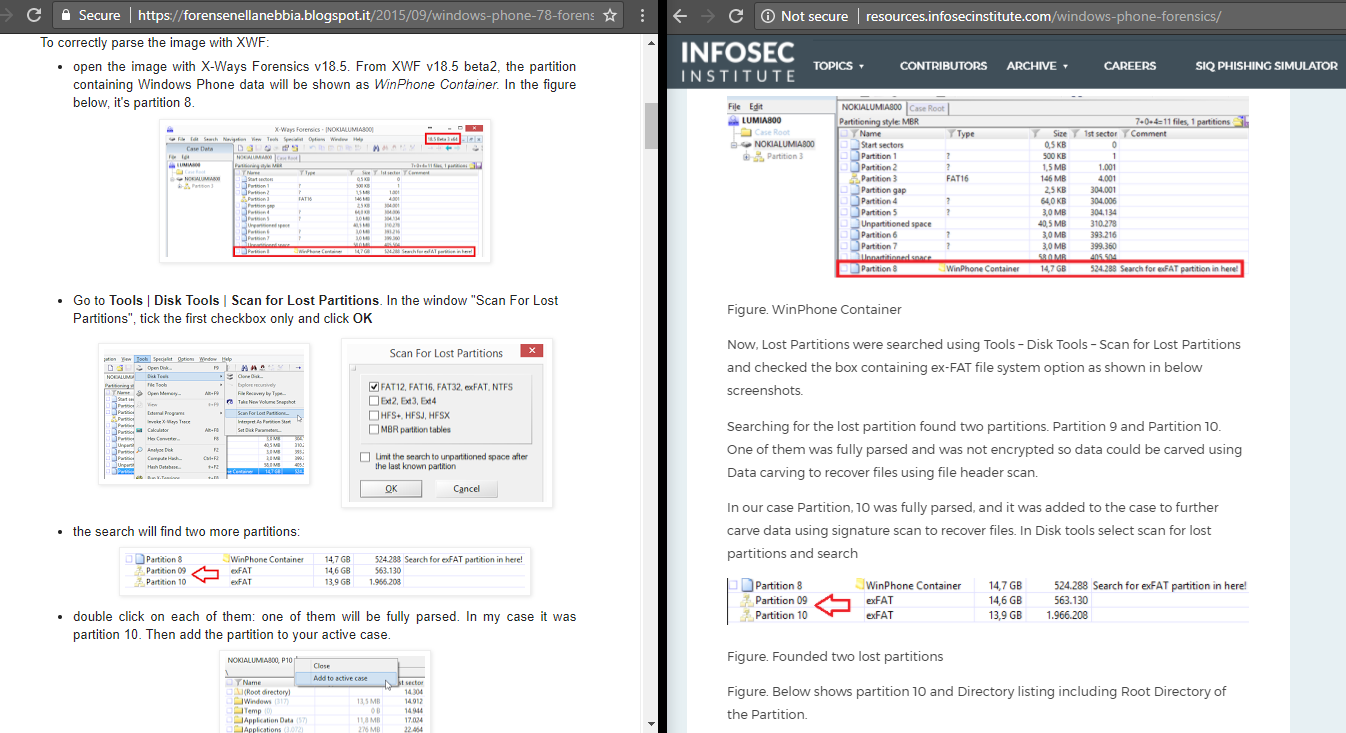
On September 5th 2015, I published on this blog an article titled  Windows Phone 7.8 Forensics.
It was about the analysis of a Nokia Lumia 800 mobile device. This is the tweet related to it:

On July 29th 2017, I found out about an article that had been published a few days before. The article is titled Windows Phone Forensics and was written by a guy named Hashim Shaikh at Infosec Institute. Unfortunately his article contains an unauthorized reproduction of my article and I wasn't even given credit for the research.

(https://i.imgur.com/SxcIZHH.png)

I immediately tried to leave a comment by going through Disqus. My comment has never been approved and is still pending.


I then tried to make Infosec Institute aware of it with a tweet. Till now there's been no answer from them.

"Please remove it" seems to me a straightforward, simple and clear request. Apparently it's not.

Since there was no reaction at all from Infosec Institute, I posted another tweet. I'm very grateful to all the people who have decided to read, comment and retweet my message. What has happened to me could have happened and could happen to anybody else.


Actually it seems that Infosec Institute is not new in plagiarizing other people's work according to Attrition.org. 

On August 4th 2017 in the morning (Italian time) I posted a similar message on Linkedin in which I mentioned both Infosec Institute and Hashim Shaikhthen. After a short while I received an invitation from the guy.


I decided not to accept his invitation and made him aware of that by posting a public comment. In my opinion a public issue has to be solved publicly. There's no room for private messages. Not after all this silence.

I  soon received a surreal comment from him that he deleted later. Deleting evidence is never a smart move.

Luckily I took a screenshot. It's so funny if you think about it: I'm fighting copy&paste with another copy&paste! Here below you can read his reply.


Wtf?! As you may imagine, this was my reaction:


Treating honest researchers as morons doesn't sound a clever move to me. Moreover, deleting a public message where you admit the truth and still deny part of it appears to be an even worse behavior. At Infosec Institute, have you ever heard the words "apology" and "ethics"?  

As a general reminder: research is the desire to understand, learn and share. It takes a lot of effort in terms of time and money. Just because this is a freely available blog doesn't mean you can grab content and take credit for someone else's work. If you can't live ethically, I'm afraid there's no place for you in the DFIR field.

Replying to his nonsense message was pointless. What I'm about to write here is a better reply.

From this part of the article I'll provide a lot of evidence to show and regain the authorship of my work. I'll stick to facts as I always do in my day-to-day job as a forensic analyst. 

We all know from school that changing the order of the addends does not change the sum. That means that simply changing the words in a sentence doesn't turn a plagiarized article into an original work. It still remains a plagiarized piece of junk.

For next time (I really hope there won't be one) I recommend the guy to use an easier tool for checking. Let me describe it: it's free, it's a search engine and doesn't forget a single detail. People call it "Google". I'm sure the guy already knows it. Apparently "Google" is the only thing he changed while copying & pasting. Do you see that unique timestamp in both articles? What a coincidence!


I also have some Google searches for other very unique keywords extracted from my research article. All these searches produce only two hits. And guess what: all the oldest hits are always related to my article ;)


If you want to double check for yourlself, these are the syntaxes for the searches:


At this point I think I deserve a public apology. Dear Infosec Institute, I'll repeat it one more time: remove the unauthorized reproduction of my article from your website.

As an analyst I rely a lot on my human brain and skills. True professionals, no matter what the field, never rely on a single tool.

I'll now let pictures speak for themselves. What follows is a comparison of the two articles: mine (on the left) and Infosec Institute's unauthorized copy (on the right - at the time of writing this blog post).


Probably somebody should think twice before writing something that is far from being the truth.

(https://imgflip.com/i/udhs9)
Here are some more comparisons:


Authors are damaged twice by plagiarism: 1) by plagiarists who take credit for somebody else's work; 2) by all the people who share in good faith plagiarized articles.

We live in an age where we are daily overwhelmed by a lot of information and none of us has the time to double-check if an article is original or not. That doesn't mean that companies or people can take advantage of that for whatever reason.

Good reputation is something that is won over the years with sweat and tears, but at the same time it's something that can be lost in a blink of an eye.

(http://www.graphicsdb.com/img78380.htm)

- - - - - - - - - - - - - - - - - - - - - - - - - - - - - - - - - - - -

[UPDATE August 9th, 2017]

InfoSec Institute took down my work from their website! Hopefully forever.
I'd like to thank those who have supported me by joining the protest that started on Twitter when I shared this blog post. 

Friday, May 6, 2016

Decrypting WhatsApp crypt9

This is a quick tutorial on how to decrypt WhatsApp crypt9 databases.

Requirements
  • an Android emulator (I used BlueStacks)
  • WhatCrypt app by TripCode - WhatsApp Database Crypt Tool (I know there is a web version of this tool, but that's something I'm not allowed to use)

For the following steps, the two tools require no internet connection to work.


Steps
  1. Run BlueStacks
  2. Drag and drop the .apk file from your PC to the emulator window in order to install WhatCrypt
  3. There's a shared folder between the host and the emulator located in: C:\ProgramData\BlueStacks\UserData\SharedFolder
  4. Copy into this folder the WhatsApp key file and your crypt9 databases. Rename the key file to whatsapp.cryptkey otherwise WhatCrypt won't be able to detect it.
  5. Run WhatCrypt
  6. Click WhatsApp database
  7. Double click on Encrypted Database Path
  8. Navigate to the path /storage/sdcard/windows/BstSharedFolder and select the crypt9 db you need to decrypt
  9. Double click Key File Path
  10. Select the whatsapp.cryptkey file
  11. Click Decrypt Database

Done! A SQLite database named msgstore.db will appear in the SharedFolder on your computer.


Saturday, April 2, 2016

WhatsApp chat parser for Windows Phone 7.8


WhatsApp messages are stored in a SQLite3 database named messages.db in the path \Applications\Data\218A0EBB-1585-4C7E-A9EC-054CF4569A79\Data\IsolatedStore. Contacts are stored in contacts.db.


Contacts.db has no embedded pictures. Contact profile pictures are stored in the subfolder profilePictures. These files are named in the format MobileNumber@s.whatsapp.net_thumb with no file extension.


Messages are stored in the table Messages of the database messages.db. The KeyFromMe field indicates if a message was received (value 0) or sent (value 1). The same table has a field named BinaryData which contains a small thumbnail of the multimedia attachment. The table MessageMiscInfos could contain a larger thumbnail in the LargeThumbnailData field. The common field between the two tables is the MessageID.


The version number of the application is stored in the file named version. The WhatsApp version 2.11.670 shown below was released late February 2015.


Based on these findings, I wrote a script to automate the parsing. To use it, type:

wp78_wa.py messages.db

The script will create four folders named based on the generated output:


Thumbnails are saved as .jpg files with the name format:
KeyRemoteJid_MessageId_ThumbnailSize.jpg.

Each conversation is saved as a separate HTML page (each table is sortable by clicking the column header). The html_short folder contains a reduced output with just a few columns. 


If you get the error sqlite3.DatabaseError: file is encrypted or is not a database
when running the script, you have to replace the sqlite3.dll file in C:\Python27\DLLs with the most recent version available here.

Tuesday, December 1, 2015

WeChat: script to convert and play AUD files

Months ago I had to extract WeChat chats from an iPhone 5S. I extracted the data from the device using the UFED Physical Analyzer software.


Each parsed conversation contained hundreds of audio messages with AUD extension and so I ended up with thousands of AUD files.

I don't know if something has changed in the meantime, but these files are not directly playable with a media player as they lack the proper AMR header. I then came across a blog post in Chinese that explained how to make these files readable:
After adding the right header, the AUD files can be played for instance with VLC but not in Windows Media Player. WMP doesn't support this format. AUD files have to be converted to something else in order to be played in WMP. The author of the post uses SoX to convert to the WAV format. I found that SoX tends to crash a lot when dealing with corrupted AUD files.
I preferred to use libav instead.

I mentioned WMP because it's a preinstalled media player and sometimes I have to hand in the extracted data to somebody with no admin rights on his computer (that means no way to install new software - like VLC) and with aversion to learn something new (for instance how to use a portable program to open the selected file).

In this scenario, what I did was to export a report in HTML format for each WeChat conversation using the Physical Analyzer. I then wrote a python script to:
  • convert AUD files to WAV files
  • fix the links inside each HTML report by replacing the .aud string with .wav


[UPDATE 03/April/2016]

I updated the script in order to decode audio messages compressed with the SILK codec. I've found useful information here:
You can download the script from my Github repository.